AI Workflow & Process Automation
 White-Label & Dedicated Teams - Offshore developers, maintenance and agency support
Headless CMS - Sanity, Payload, Storyblok, Prismic, Contentful, Strapi and Next.js
AI Solutions - AI agents, chatbots, automation and machine learning
WordPress & WooCommerce - Custom themes, plugins and online stores
Shopify & eCommerce - Shopify, BigCommerce, PrestaShop and Webflow builds
HubSpot CMS - Custom themes, modules and integrations
Custom Web Development - PHP, Laravel, CodeIgniter, CakePHP, MERN and MEAN
Mobile App Development - iOS, Android, Flutter and React Native
Business Software - CRM, ERP, SaaS and enterprise applications
UI/UX & Frontend - Figma, design systems and pixel-accurate Figma-to-HTML
White-Label & Dedicated Teams - Offshore developers, maintenance and agency support
Headless CMS - Sanity, Payload, Storyblok, Prismic, Contentful, Strapi and Next.js
AI Solutions - AI agents, chatbots, automation and machine learning
WordPress & WooCommerce - Custom themes, plugins and online stores
Shopify & eCommerce - Shopify, BigCommerce, PrestaShop and Webflow builds
HubSpot CMS - Custom themes, modules and integrations
Custom Web Development - PHP, Laravel, CodeIgniter, CakePHP, MERN and MEAN
Mobile App Development - iOS, Android, Flutter and React Native
Business Software - CRM, ERP, SaaS and enterprise applications
UI/UX & Frontend - Figma, design systems and pixel-accurate Figma-to-HTML
Less chasing, more doing
Workflow & Business Process Automation
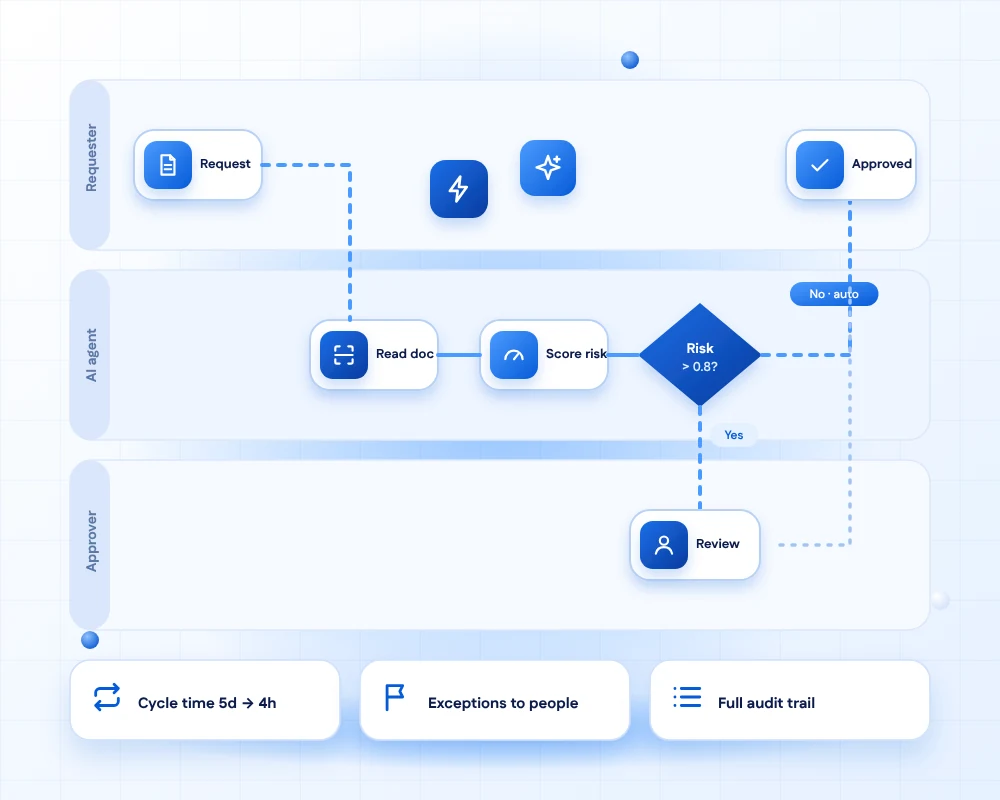
Much office work is moving information from one place to another: reading an invoice, keying it in, asking someone to approve it and chasing when they do not. These steps are repetitive, slow and easy to get wrong.
We automate them with workflows that combine business rules, integrations and AI. AI reads documents and emails, rules decide the path, and people step in for exceptions and approvals.
Every workflow keeps a full audit trail, so you can see what was decided, by what and when.
- 11+Years of building business software
- 50+Global long-term clients
- 2,000+Projects delivered
- 24 hrsResponse time on queries
How a workflow runs
The anatomy of an automated process
Five parts that every workflow we build is made of.
Trigger
Something starts the workflow: an email, a form, a new record or a schedule.
Capture
Data is read from documents and messages, and checked for completeness.
Decide
Rules and AI score the case, and send it down the right path.
Act
Systems are updated, messages sent and approvals requested, automatically.
Audit
Every step is logged, so you can show who and what decided and when.
What we automate
Work that runs itself
Six common starting points, and most businesses begin with one or two.
Document processing
Invoices, contracts, forms and IDs are read, validated and routed, with exceptions flagged for a person.

Approvals
Purchase requests, leave, expenses and discounts follow your rules, with reminders and escalation.

Onboarding
New customer, vendor or employee onboarding runs as one coordinated flow across teams and systems.

Customer requests
Incoming emails and forms are classified, answered or assigned to the right team in seconds.

Data entry and sync
Bots and integrations remove copy-and-paste between applications.

Reporting
Weekly and month-end reports build themselves from live data and arrive on time.
AI in your workflows
AI reads and sorts, people decide
AI deals with the messy, unstructured parts. Rules and humans keep the process safe.

Document understanding
AI reads messy, varied documents and pulls out the fields your process needs, with a confidence score.

Smart routing
Cases are classified and sent to the right person or queue, based on content and urgency.

Draft responses
Replies and summaries are drafted from your own knowledge base for a person to approve.

Exception handling
Low-confidence or high-risk cases are escalated to a human with the evidence attached.
Use cases
See it in action
Pick a process to see how it is typically automated.
Invoice to payment, without the inbox
Supplier invoices arrive by email or portal, are read and matched to purchase orders, and routed for approval.
- Extract fields from invoices and receipts
- Three-way match with orders and goods receipts
- Approval routing by amount and cost centre
- Posting to your accounting system
Day one, ready to go
A signed offer triggers accounts, equipment requests, training and paperwork across HR, IT and managers.
- Checklists with owners and deadlines
- Accounts created in connected systems
- Reminders for documents and training
- Single status view for HR
Requests sorted before a person looks
Emails and forms are classified by topic and urgency, and routine ones get drafted answers.
- Topic and priority detection
- Draft replies from your knowledge base
- Smart routing to the right team
- Escalation when a deadline is near
Faster sign-off with a record
Contracts and policies move through review with clauses highlighted and a trail of approvals.
- Clause detection and risk highlights
- Parallel reviews with deadlines
- E-signature integration
- Searchable repository
Reports that arrive on their own
Data from several systems is combined, checked and delivered on schedule to the people who need it.
- Pulls from CRM, ERP and spreadsheets
- Data quality checks before sending
- Narrative summaries drafted by AI
- Alerts when numbers move unexpectedly
Trustworthy automation
Automation you can explain and control
The safeguards that let you rely on it.
- Human in the loopYou choose which steps need approval, and low-confidence cases always go to a person.
- Full audit trailEvery automated decision records inputs, rules, confidence and outcome.
- Safe failureWhen something breaks, the case stops safely and alerts the owner, rather than guessing.
- Clear ownershipEach workflow has an owner, an SLA and a dashboard.
- Easy to changeBusiness users can adjust rules and thresholds without a code release.
- Secure by designRole-based access, encrypted data and least-privilege connections to your systems.
Want a chatbot or AI agent to handle conversations too?
Our AI services team builds agents, chatbots and automations that work with your workflows.
FAQs
Automation & AI questions, answered
It is using software to run repetitive, rule-based work such as approvals, data entry, document handling and reporting, so people spend their time on exceptions, decisions and customers.
Traditional automation follows fixed rules on structured data. AI adds the ability to read unstructured content such as emails and documents, classify it and handle variation, while rules and human approvals keep it safe and predictable.
Look for work that is frequent, rule-based, slow because of waiting or re-keying, and spread across several systems. Invoice handling, onboarding, approvals and recurring reports are common first targets. We help you rank them by effort and return.
The aim is to remove the repetitive parts of jobs, not the people. Staff move from typing and chasing to reviewing exceptions and doing work that needs judgement. We design the workflow with your team so it fits how they work.
It does not guess. Each decision carries a confidence score, and anything below the threshold you set is routed to a person with the supporting information. Over time, thresholds can be tuned using real results.
Yes. We connect through APIs where they exist, and use database, file or interface automation where they do not. Workflows can span your CRM, ERP, email, accounting and document stores.
We log every step, enforce approval rules and separation of duties, restrict access and keep data inside your approved environments. For regulated industries we design the controls with your compliance team.
A single, well-defined workflow can often be live within a few weeks. We start with a pilot on one process, measure the result and then extend to others.
We agree measures before we start, such as cycle time, error rate, hours saved and cost per case, and report them on a dashboard so the benefit is visible.
Yes. We monitor, adjust rules, add new document types and extend to new processes under a support plan.
Ready to automate the busywork?
Tell us which process eats the most time. We will help pick a first workflow, show the likely benefit and build a pilot.