AI Product & Interface Design
 White-Label & Dedicated Teams - Offshore developers, maintenance and agency support
Headless CMS - Sanity, Payload, Storyblok, Prismic, Contentful, Strapi and Next.js
AI Solutions - AI agents, chatbots, automation and machine learning
WordPress & WooCommerce - Custom themes, plugins and online stores
Shopify & eCommerce - Shopify, BigCommerce, PrestaShop and Webflow builds
HubSpot CMS - Custom themes, modules and integrations
Custom Web Development - PHP, Laravel, CodeIgniter, CakePHP, MERN and MEAN
Mobile App Development - iOS, Android, Flutter and React Native
Business Software - CRM, ERP, SaaS and enterprise applications
UI/UX & Frontend - Figma, design systems and pixel-accurate Figma-to-HTML
White-Label & Dedicated Teams - Offshore developers, maintenance and agency support
Headless CMS - Sanity, Payload, Storyblok, Prismic, Contentful, Strapi and Next.js
AI Solutions - AI agents, chatbots, automation and machine learning
WordPress & WooCommerce - Custom themes, plugins and online stores
Shopify & eCommerce - Shopify, BigCommerce, PrestaShop and Webflow builds
HubSpot CMS - Custom themes, modules and integrations
Custom Web Development - PHP, Laravel, CodeIgniter, CakePHP, MERN and MEAN
Mobile App Development - iOS, Android, Flutter and React Native
Business Software - CRM, ERP, SaaS and enterprise applications
UI/UX & Frontend - Figma, design systems and pixel-accurate Figma-to-HTML
Interfaces for intelligent products
AI Product & Interface Design
AI changes what an interface has to do. Instead of fixed screens with predictable results, people meet answers that can be wrong, work that takes time and actions taken on their behalf. Good design makes that feel clear, safe and under their control.
We design chat assistants, copilots, generative interfaces and agent workflows for web and mobile products, from the first concept to a prototype you can test with real people and a component library your developers can build.
We use AI in our own design process too, to explore, prototype and test faster. Our designers decide what ships.
- 11+Years of design experience
- 50+Global long-term clients
- 2,000+Projects delivered
- 24 hrsResponse time on queries
What we design
Six kinds of AI experience
Whatever form your AI takes, the person using it needs to feel informed and in control.

Assistants & chat
Conversational screens that stream answers, show sources and make it easy to correct or try again.
Web & mobile
Copilots inside your product
Helpers that sit beside the work, suggest the next step and never get in the way.
In-context
Generative interfaces
The model returns structured data and your own components display it, so results always look like your product.
Your components
Agent workflows
Screens for tasks that run for minutes or hours, with progress, approvals and clear hand-offs to a person.
Long-running
Smart search & recommendations
Results found by meaning, with clear reasons for each suggestion and simple ways to refine them.
Discovery
AI settings & controls
Privacy choices, tone, and how much the AI may do on its own, set in plain language.
Control
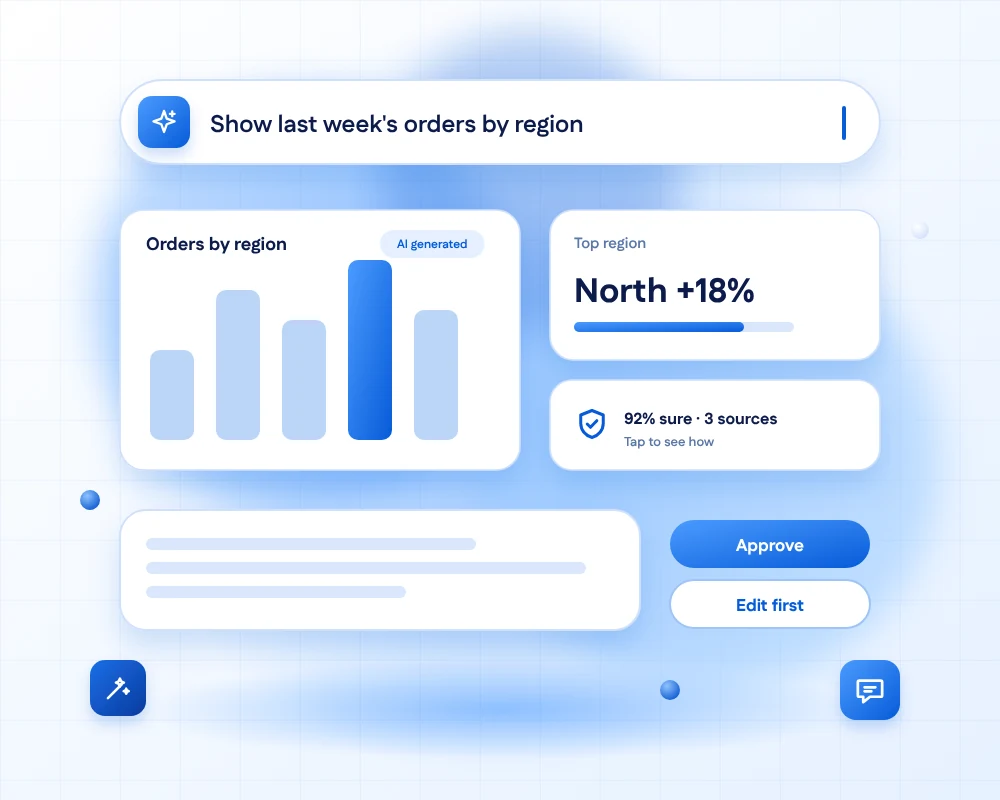
Anatomy of an AI screen
The details that build trust
Five things almost every good AI screen gets right.
12345
A clear way to ask
Plain prompts, examples and shortcuts, so people know what the AI can do and how to ask for it.
AI content is labelled
People can always tell what the AI made and what came from your data or a person.
Confidence and sources
Reasons, sources and limits are one tap away, so people know when to double-check.
Controls, not commands
Approve, edit, undo or stop. The person stays in charge of anything that matters.
Answers that arrive as they are made
Streaming text and visible progress make waiting feel short.
Our principles
Six rules for designing with AI
Whatever the product, these rules guide every screen we design, and every decision we test.

Be honest about uncertainty
Show confidence, sources and limits, so people know when to double-check an answer.

Keep people in control
Easy undo, edit-before-send and a clear way to stop the AI or take over.

Make waiting feel fast
Stream answers, show progress and let people keep working while longer tasks run.

Design for being wrong
Plan calm, clear states for errors, empty answers and requests the AI should not handle.

Ask permission with context
Explain what data is used and why, and ask before any sensitive action.

Learn from feedback
Simple ratings, corrections and reports that help the product improve over time.
How we work
From question to tested prototype
Four steps that put real AI output in front of real people early.

Frame the problem
We decide where AI genuinely helps, what success looks like and what must never go wrong.
Explore interactions
We sketch several ways the AI could work with the user and pick the clearest.

Prototype with real output
Prototypes connect to a real model, so we test real answers, delays and mistakes.

Test with people
We watch people complete real tasks, then fix what confuses or worries them.
AI in our own process
We design AI products with AI
Used carefully, AI makes design work faster. Used carelessly, it hides problems. This is how we use it.
Prototypes with real model output
We test with live responses from the start, because mock answers hide the hard problems.
Simulated users for early checks
AI personas help us stress-test flows early, but they never replace sessions with real people.

Faster variations
AI helps us explore many layouts and wordings, and our designers choose what works.
What you receive
Your AI design package
Everything your team needs to build the experience with confidence.
- Interaction principlesA short guide to how AI should behave and speak in your product.
- Flows and statesEvery screen, including loading, empty, error and low-confidence states.
- Interactive prototypeA clickable prototype that can use live model responses.
- Component libraryMessage, citation, approval and feedback components for your design system.
- Tone and prompt guidelinesVoice, wording and safe-reply rules your team can reuse.
- Test planReal tasks and measures for judging quality, safety and trust.
Designing a whole product, not only the AI?
Our UI/UX service covers research, flows, prototypes and testing for the rest of your product, with the same team and the same design system.
FAQs
AI interface design questions, answered
It is the design of products that use AI, such as assistants, copilots and automated workflows. It covers how people ask, how answers are shown, how mistakes are handled and how much control the person keeps.
Normal screens give predictable results. AI answers can be wrong, slow or different each time, and AI can act for the user. So we design for uncertainty, waiting, correction and permission, in addition to layout and style.
Yes. We design chat assistants, copilots inside existing products, generative interfaces and agent workflows, for web and mobile. We start with where AI genuinely helps, because a chat box is not always the best answer.
Yes. We connect prototypes to a real model, so we can test real answers, delays and mistakes with users before any production code is written.
We show sources and confidence, label AI content, explain what data is used and ask before sensitive actions. We design with transparency and consent in mind, and we recommend checking the legal requirements for your market with a legal professional.
Yes. Our development team can build the interface and connect it to the AI model, from the same design files, so nothing is lost between design and code.
We design to work with any major model, including OpenAI, Anthropic Claude and Google Gemini, and with open models. The design should survive a change of provider.
A focused AI feature, such as an assistant or a copilot panel, can often be designed and prototyped in a few weeks. After a short discovery call we agree the scope, timeline and a fixed price or monthly rate.
Ready to design an AI experience people trust?
Tell us what your AI should do and who it is for. We will suggest the right form, prototype it with real model output and test it with your users.