Progressive Web App Development
 White-Label & Dedicated Teams - Offshore developers, maintenance and agency support
Headless CMS - Sanity, Payload, Storyblok, Prismic, Contentful, Strapi and Next.js
AI Solutions - AI agents, chatbots, automation and machine learning
WordPress & WooCommerce - Custom themes, plugins and online stores
Shopify & eCommerce - Shopify, BigCommerce, PrestaShop and Webflow builds
HubSpot CMS - Custom themes, modules and integrations
Custom Web Development - PHP, Laravel, CodeIgniter, CakePHP, MERN and MEAN
Mobile App Development - iOS, Android, Flutter and React Native
Business Software - CRM, ERP, SaaS and enterprise applications
UI/UX & Frontend - Figma, design systems and pixel-accurate Figma-to-HTML
White-Label & Dedicated Teams - Offshore developers, maintenance and agency support
Headless CMS - Sanity, Payload, Storyblok, Prismic, Contentful, Strapi and Next.js
AI Solutions - AI agents, chatbots, automation and machine learning
WordPress & WooCommerce - Custom themes, plugins and online stores
Shopify & eCommerce - Shopify, BigCommerce, PrestaShop and Webflow builds
HubSpot CMS - Custom themes, modules and integrations
Custom Web Development - PHP, Laravel, CodeIgniter, CakePHP, MERN and MEAN
Mobile App Development - iOS, Android, Flutter and React Native
Business Software - CRM, ERP, SaaS and enterprise applications
UI/UX & Frontend - Figma, design systems and pixel-accurate Figma-to-HTML
App feel, web reach
Progressive Web Apps That People Install
Asking customers to download an app is a big ask. Many will not, and building separate web, iPhone and Android versions is expensive.
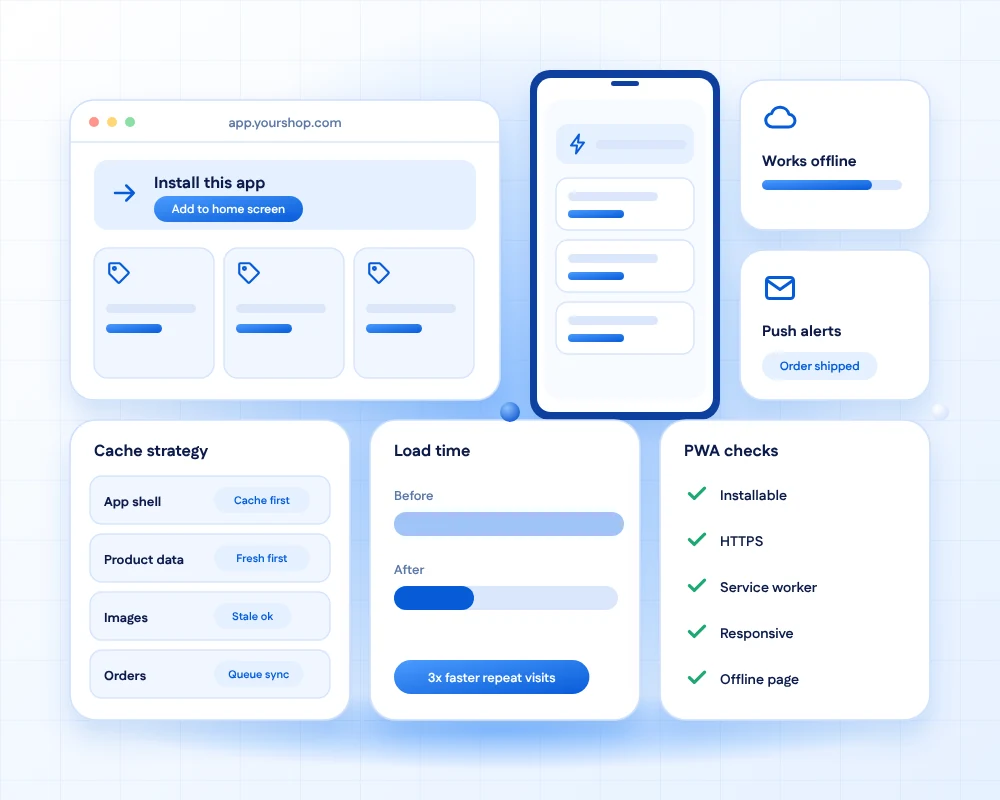
A progressive web app gives you an installable, fast, offline-ready experience from a single web codebase. People open a link, add it to their home screen and come back through notifications they chose.
We build PWAs that work well on poor networks, test them on real devices and tell you honestly where a native app would serve you better.
- 11+Years of building business software
- 50+Global long-term clients
- 2,000+Projects delivered
- 24 hrsResponse time on queries
Why it matters
From a plain site to an installable app
What changes when the web behaves like an app.
Before
A typical website- Customers must find, download and update an app from a store
- The site is unusable when the connection drops
- Separate web, iOS and Android teams and budgets
- No way to bring users back after they leave the site
After
A progressive web app- Open a link, then add the app to the home screen in two taps
- Key screens keep working offline and sync later
- One web codebase for phones, tablets and desktops
- Push notifications and a home-screen icon bring users back
What you get
Six capabilities that make it feel like an app
Delivered through the browser, from one codebase.

Installable
Users add the app to the home screen from the browser. It opens full screen with its own icon.
Install
Offline-ready
A service worker caches the app shell and key data, so people can keep working on a poor connection.
Offline
Push notifications
Order updates, reminders and alerts that reach users who opted in, on supported devices.
Re-engage
Fast repeat visits
Cached assets make the second visit and every later one load far quicker than the first.
Speed
Background sync
Forms and orders made offline are sent when the connection returns.
Sync
One link for everyone
Share by URL, find through search and update instantly, with no store review in the way.
Reach
Where it fits
Good matches for a PWA
PWAs shine when reach, speed and cost matter more than deep device features.
We tell you early if your needs point to a native or cross-platform app instead.

Retail and ordering
Fast catalogues, saved baskets and order alerts.

Field and service teams
Checklists and forms that work in basements and rural areas.

Bookings and memberships
Reminders, passes and quick re-booking.
Content and news
Offline reading and breaking-news alerts.

Internal tools
Dashboards and approvals on any staff device, without app store setup.

AI assistants
Chat and voice helpers that live in an installable app.
What we measure
Success beyond the install
We agree these measures at the start.
How we work
From fit check to tested app
Five steps that keep a PWA dependable.
Decide if PWA is the right fit
Check which device features you need and whether the web can deliver them.
FitDesign for thumbs and slow networks
Mobile-first screens, light pages and clear offline states.
DesignBuild the app shell
Responsive front end, manifest and service worker with a cache plan per content type.
BuildAdd native-feel features
Install prompts, push, background sync and, where useful, camera or location.
ExtendTest on real devices
Check iOS, Android and desktop browsers, plus airplane-mode and slow-network runs.
Prove
Built to be trusted
What we verify before launch
The details that separate a PWA from a website with an icon.
- Cache strategy per contentApp shell, data and images each get the right rule, so nothing goes stale unnoticed.
- Safe updatesNew versions roll out without trapping users on an old copy.
- Clear offline statesPeople always know what works offline and what is waiting to sync.
- HTTPS and securityEncrypted traffic, safe storage and sensible permission prompts.
- Cross-browser testedBehaviour verified on current iOS, Android and desktop browsers.
- Lighthouse PWA auditInstallability and performance checks run before each release.
Need a store-listed app instead?
Cross-platform apps share one codebase across iPhone and Android and can reach the app stores.
FAQs
Progressive web app questions, answered
A progressive web app is a website built with extra capabilities such as installing on the home screen, working offline and sending notifications, so it feels much like a native app while still running in the browser.
A PWA suits many business and content apps and costs less to build and maintain. Native apps are better when you need deep device features, heavy graphics or a presence in the app stores. We help you weigh this honestly.
Yes. On iPhone you add a PWA to the home screen from Safari, and push notifications are supported on recent iOS versions for installed apps. Some device features remain more limited than in native apps, so we test your needs early.
Yes, for what we plan for. We cache the app shell and key content and queue actions to send later. Features that need live data, such as payments, still need a connection.
Yes, on supported browsers and for users who opt in. We design when to ask permission and what to send, so notifications help instead of annoy.
Not necessarily. Many teams ship only the PWA. If you also want a store listing, a PWA can sometimes be wrapped for stores, though store rules apply.
A responsive website adapts to screen size. A PWA adds installation, offline use, background sync and notifications on top of that.
Yes, often as a first step. We add a manifest, service worker and offline plan, fix speed problems and test on real devices.
Upgrading an existing site often takes three to six weeks. A new PWA with accounts and sync typically takes two to four months.
Updating the service worker and dependencies, watching browser changes, checking performance and fixing issues, under a support plan with agreed response times.
Ready for a web app people keep on their home screen?
Tell us who will use it and what they need to do. We will tell you whether a PWA fits and propose a plan with an honest estimate.