AI-Powered Design Systems
 White-Label & Dedicated Teams - Offshore developers, maintenance and agency support
Headless CMS - Sanity, Payload, Storyblok, Prismic, Contentful, Strapi and Next.js
AI Solutions - AI agents, chatbots, automation and machine learning
WordPress & WooCommerce - Custom themes, plugins and online stores
Shopify & eCommerce - Shopify, BigCommerce, PrestaShop and Webflow builds
HubSpot CMS - Custom themes, modules and integrations
Custom Web Development - PHP, Laravel, CodeIgniter, CakePHP, MERN and MEAN
Mobile App Development - iOS, Android, Flutter and React Native
Business Software - CRM, ERP, SaaS and enterprise applications
UI/UX & Frontend - Figma, design systems and pixel-accurate Figma-to-HTML
White-Label & Dedicated Teams - Offshore developers, maintenance and agency support
Headless CMS - Sanity, Payload, Storyblok, Prismic, Contentful, Strapi and Next.js
AI Solutions - AI agents, chatbots, automation and machine learning
WordPress & WooCommerce - Custom themes, plugins and online stores
Shopify & eCommerce - Shopify, BigCommerce, PrestaShop and Webflow builds
HubSpot CMS - Custom themes, modules and integrations
Custom Web Development - PHP, Laravel, CodeIgniter, CakePHP, MERN and MEAN
Mobile App Development - iOS, Android, Flutter and React Native
Business Software - CRM, ERP, SaaS and enterprise applications
UI/UX & Frontend - Figma, design systems and pixel-accurate Figma-to-HTML
Design once, build everywhere
Design Systems & Component Libraries
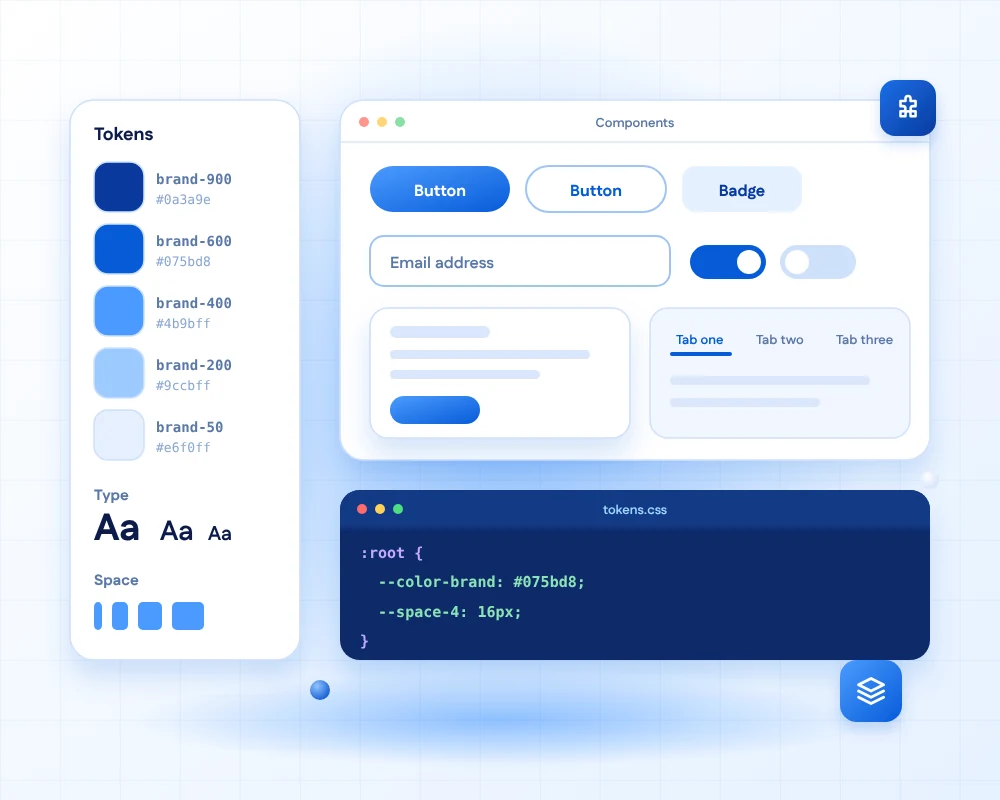
A design system is the shared language between design and code: colours, type, spacing and components, defined once and used everywhere. It keeps products consistent, speeds up every new screen and makes redesigns far less painful.
We build design systems in Figma with variables and reusable components, turn them into design tokens and coded components in React, Vue, Angular or plain HTML and CSS, and document them in Storybook so everyone can find and use them.
AI makes them easier to keep healthy. It can spot components that drift from the system, draft documentation and tests, and help AI coding tools use your system correctly, so generated screens still look like your brand.
- 11+Years of design and front-end experience
- 50+Global long-term clients
- 2,000+Projects delivered
- 24 hrsResponse time on queries
How a system is built
From small parts to whole pages
Each level is built from the one before, so a change at the bottom flows all the way up.
-
Level 1
Tokens & atoms
The smallest building blocks, defined once and used everywhere.
ColourTypeSpacingIconsButtons -
Level 2
Molecules
Small groups of atoms that do one job well.
Form fieldSearch boxTagTooltip -
Level 3
Organisms
Larger parts of an interface built from molecules.
HeaderProduct cardData tableModal -
Level 4
Templates & pages
Whole layouts, assembled from the parts below, in minutes.
Landing pageDashboardCheckout
From Figma to code
One source of truth, two worlds
Tokens carry your decisions from the design file into the codebase without retyping a single value.

Figma variables
Colours, type and spacing live as variables and styles in your Figma library.

Design tokens
We export them as a single, versioned token file.
"brand": "#075bd8"
Code variables
Tokens become CSS variables or a Tailwind theme.
--color-brand
Coded components
Buttons, forms and layouts built in React, Vue, Angular or web components.
Storybook docs
Every component documented, tested and ready to copy.
Tokens in action
Change it once, update everywhere
Each token has a name, a value and a purpose. Components use the name, never the value.
- brand-900
--color-brand-900#0a3a9e - brand-600
--color-brand-600#075bd8 - brand-400
--color-brand-400#4b9bff - brand-200
--color-brand-200#9ccbff - brand-50
--color-brand-50#e6f0ff - text
--color-text#123663
AI and your design system
Keeping the system healthy and AI-ready
A design system is only useful while it matches reality. AI helps keep it honest, and a developer reviews every change.

Drift detection
AI compares designs and code to find components that no longer match the system.
Docs and stories
Usage notes and Storybook stories are drafted from your components, then reviewed.

Tests alongside
Accessibility and visual tests are written with each component.

AI-ready systems
Documented tokens and components help AI coding tools build screens that still look like your brand.
Why it pays off
Life with and without a system
The gap grows with every new screen, product and team member.
| Topic | Without a design system | With a design system |
|---|---|---|
| New screens | Designed and built from scratch every time. | Assembled from ready-made, tested components. |
| Consistency | Buttons and colours slowly drift between teams. | One source of truth for design and code. |
| Changes | A rebrand means editing hundreds of places. | Change a token once and every component updates. |
| Accessibility | Fixed one screen at a time, if at all. | Built into each component and inherited everywhere. |
| Hand-off | Redlines, screenshots and back-and-forth. | The same components exist in design and in code. |
What is included
Your design system package
Everything designers and developers need, in one organised release.
- Figma component libraryVariables, styles and components with variants, ready for designers.
- Design tokensExported as JSON, CSS variables or a Tailwind theme.
- Coded componentsReact, Vue, Angular or web components, matching Figma exactly.
- Storybook documentationLive examples, usage rules and code for every component.
- Accessibility built inKeyboard support, focus states, ARIA and AA contrast.
- Contribution guideSimple rules so the system stays healthy as your team grows.
Starting from a Figma design?
Our design-to-code service turns your Figma, XD, Sketch or PSD files into clean, responsive pages, on top of a design system or without one.
FAQs
Design system questions, answered
It is a shared set of design decisions and reusable parts: colours, type, spacing and components, with guidance on how to use them. It exists in Figma for designers and in code for developers, so both build the same product.
A style guide describes how things should look. A design system also includes the working, coded components and the tokens behind them, so teams do not just read the rules, they use the parts.
It pays off when you have several screens, products or teams, or when a product will keep growing. For a small, one-off website a lighter UI kit is often enough. We tell you honestly which fits.
React and Next.js, Vue, Angular, web components, or plain HTML and CSS with Tailwind. We match your stack, so the system fits how your developers already work.
Storybook is a workshop for components. Each component is shown on its own with its variants, notes and tests, so designers, developers and testers can all see exactly how it should look and behave.
Yes. We audit your current screens, list the components and styles already in use, remove the duplicates and turn what remains into a clean, documented system, without a big-bang redesign.
AI helps us find drift between design and code, draft documentation and tests, and keep the system current. A well-documented system also helps AI coding tools generate screens that use your real components and tokens rather than inventing new styles.
A focused starter system of the most-used components can be ready in a few weeks, and a full system grows over time. After an audit we offer a fixed price for the first release, then a monthly plan to extend and maintain it.
Ready to build a design system that lasts?
Share your product or your Figma files. We will audit what you have, suggest where a system will save the most time, and plan a first release.