AI-Powered Mobile Apps
 White-Label & Dedicated Teams - Offshore developers, maintenance and agency support
Headless CMS - Sanity, Payload, Storyblok, Prismic, Contentful, Strapi and Next.js
AI Solutions - AI agents, chatbots, automation and machine learning
WordPress & WooCommerce - Custom themes, plugins and online stores
Shopify & eCommerce - Shopify, BigCommerce, PrestaShop and Webflow builds
HubSpot CMS - Custom themes, modules and integrations
Custom Web Development - PHP, Laravel, CodeIgniter, CakePHP, MERN and MEAN
Mobile App Development - iOS, Android, Flutter and React Native
Business Software - CRM, ERP, SaaS and enterprise applications
UI/UX & Frontend - Figma, design systems and pixel-accurate Figma-to-HTML
White-Label & Dedicated Teams - Offshore developers, maintenance and agency support
Headless CMS - Sanity, Payload, Storyblok, Prismic, Contentful, Strapi and Next.js
AI Solutions - AI agents, chatbots, automation and machine learning
WordPress & WooCommerce - Custom themes, plugins and online stores
Shopify & eCommerce - Shopify, BigCommerce, PrestaShop and Webflow builds
HubSpot CMS - Custom themes, modules and integrations
Custom Web Development - PHP, Laravel, CodeIgniter, CakePHP, MERN and MEAN
Mobile App Development - iOS, Android, Flutter and React Native
Business Software - CRM, ERP, SaaS and enterprise applications
UI/UX & Frontend - Figma, design systems and pixel-accurate Figma-to-HTML
AI that earns its place in your app
AI-Powered Mobile App Development
People now expect apps to understand them: to find what they mean, to read a photo, to answer in plain language. Done well, AI features save users time. Done carelessly, they cost money, leak data and give wrong answers.
We add practical AI to iOS and Android apps, new or existing, starting with the one or two features that make a real difference and building in privacy, cost control and testing from the start.
Where a mistake would matter, a person stays in the loop. Our engineers review every feature before it reaches your users.
- 11+Years of building business software
- 50+Global long-term clients
- 2,000+Projects delivered
- 24 hrsResponse time on queries
What we add
Six AI features users actually value
Each one solves a clear problem, rather than adding AI for its own sake.

In-app assistants
A helpful chat or voice assistant that answers questions from your own content and knows when to hand over to a person.
Assistant
Smart search
Search that understands what people mean, not only the words they type, across products, help articles or documents.
Search
Camera & image understanding
Scan documents, read labels, recognise products or check photo quality straight from the phone camera.
Vision
Voice & speech
Dictation, voice commands and spoken answers for hands-free and accessible experiences.
Voice
Recommendations
Suggest the next item, article or action based on what a person has actually done in the app.
Personalise
Summaries & drafting
Condense long content or draft replies and notes, with the user always in control of what is sent.
Language
Where AI runs
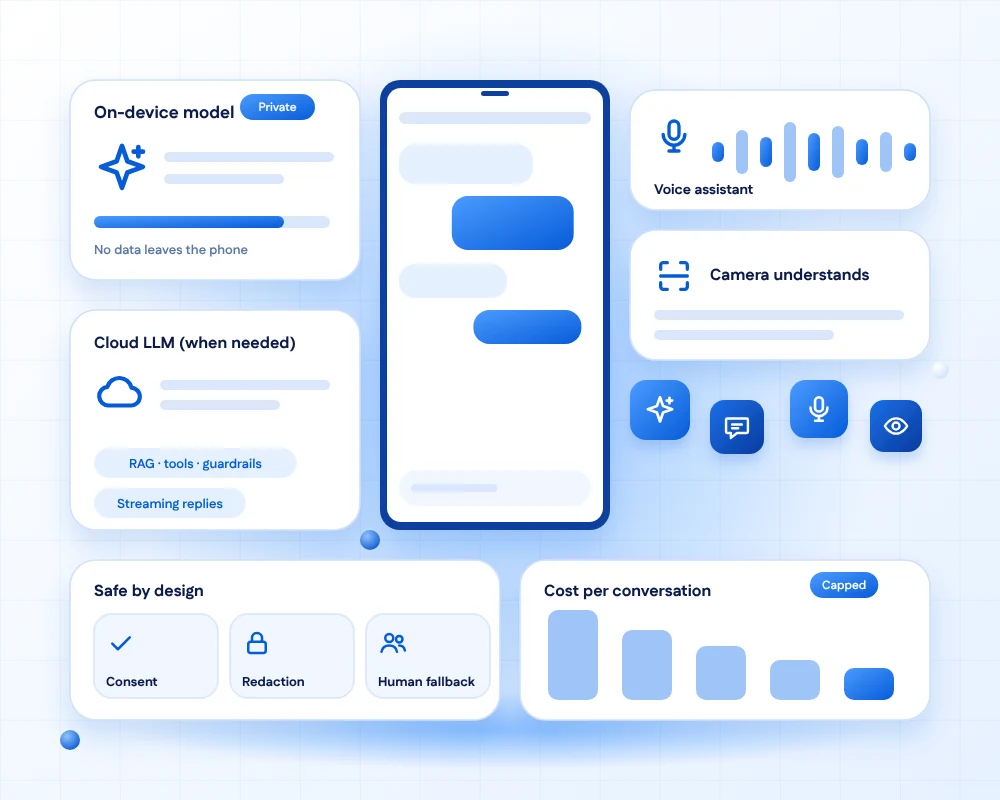
On the device, in the cloud, or both
The choice affects privacy, cost, speed and offline use.

On the device
Runs on the phone itself. Works offline and keeps data local, but models must be small enough for the device.

In the cloud
Uses larger models through an API. More capable, but needs a connection and careful handling of data sent out.

Hybrid
Quick, private tasks on the device and heavier reasoning in the cloud, chosen per feature.
How we build it responsibly
Useful, safe and affordable
Four principles guide every AI feature we ship.

Privacy first
We send the minimum data, tell users what is shared, and avoid sending sensitive data to third-party models unless you agree to it.

Human in the loop
Where mistakes matter, such as health, money or legal text, a person reviews or confirms before anything happens.

Cost control
Caching, smaller models for simple jobs and usage limits keep AI running costs predictable.

Tested like any feature
We evaluate answers on real examples, track quality over time and test for harmful or off-topic output.
How we work
From use case to monitored launch
Five steps that keep AI features useful and under control.
Find the use case
Pick the one or two places where AI saves users real time, not the ones that sound impressive.
DiscoveryPrototype quickly
Test the idea with real content and real users before building it into the app.
PrototypeDesign the guardrails
Decide what the AI may do, what it must never do, and how it fails safely.
SafetyBuild and evaluate
Integrate, test on a set of real examples and measure quality, speed and cost.
EvaluateLaunch and monitor
Release gradually, watch quality and cost, and improve from real usage.
Operate
What we measure
Quality is a number we track
We agree these measures before building, and report on them after launch.
Building an AI product, not only an AI feature?
Our AI product interface design service covers chat, agents and copilots end to end.
FAQs
AI mobile app questions, answered
It means adding AI features to an iOS or Android app, such as assistants, smart search, camera and voice understanding or recommendations. The work covers choosing the use case, the model, privacy, testing and cost control, not just calling an API.
On-device AI is private and works offline, but suits smaller tasks. Cloud AI is more capable but needs a connection and careful data handling. Many apps combine both. We choose per feature.
We send the minimum data needed, avoid sending sensitive data to outside models unless you agree, explain sharing clearly to users and follow store privacy rules. For sensitive apps, we favour on-device processing.
Yes, AI can be wrong. We reduce this by grounding answers in your own content, testing on real examples, adding human review where mistakes matter and showing users when they are talking to AI.
Cost depends on the model, how often people use the feature and how much text or imagery is processed. We estimate the cost per user up front and use caching, smaller models and limits to keep it predictable.
Yes. Most AI features can be added to an existing iOS, Android, Flutter or React Native app without a rewrite. We start with one feature, measure it and build on it.
We choose models for each feature based on quality, cost, speed and data rules, and design the app so that the model can be changed later without rebuilding.
Usually not. Most business features work well with existing models plus your own content and good evaluation. Custom training is considered only when there is a clear need and enough data.
We build a test set of real examples, score the answers, test for off-topic or unsafe output, and monitor quality after launch. Quality is a number we track, not a feeling.
We monitor quality and cost, update prompts and models, and improve features based on real usage, under a plan with agreed response times.
Ready to add AI to your app?
Tell us about your app and your users. We will suggest the features worth building first, where they should run and what they will cost to operate.