Enterprise Mobile App Development
 White-Label & Dedicated Teams - Offshore developers, maintenance and agency support
Headless CMS - Sanity, Payload, Storyblok, Prismic, Contentful, Strapi and Next.js
AI Solutions - AI agents, chatbots, automation and machine learning
WordPress & WooCommerce - Custom themes, plugins and online stores
Shopify & eCommerce - Shopify, BigCommerce, PrestaShop and Webflow builds
HubSpot CMS - Custom themes, modules and integrations
Custom Web Development - PHP, Laravel, CodeIgniter, CakePHP, MERN and MEAN
Mobile App Development - iOS, Android, Flutter and React Native
Business Software - CRM, ERP, SaaS and enterprise applications
UI/UX & Frontend - Figma, design systems and pixel-accurate Figma-to-HTML
White-Label & Dedicated Teams - Offshore developers, maintenance and agency support
Headless CMS - Sanity, Payload, Storyblok, Prismic, Contentful, Strapi and Next.js
AI Solutions - AI agents, chatbots, automation and machine learning
WordPress & WooCommerce - Custom themes, plugins and online stores
Shopify & eCommerce - Shopify, BigCommerce, PrestaShop and Webflow builds
HubSpot CMS - Custom themes, modules and integrations
Custom Web Development - PHP, Laravel, CodeIgniter, CakePHP, MERN and MEAN
Mobile App Development - iOS, Android, Flutter and React Native
Business Software - CRM, ERP, SaaS and enterprise applications
UI/UX & Frontend - Figma, design systems and pixel-accurate Figma-to-HTML
Mobile apps your business can trust
Enterprise Mobile App Development
Business apps are judged differently. They have to be secure, connect to the systems you already run, work in a warehouse with poor signal and be adopted by people who did not choose them.
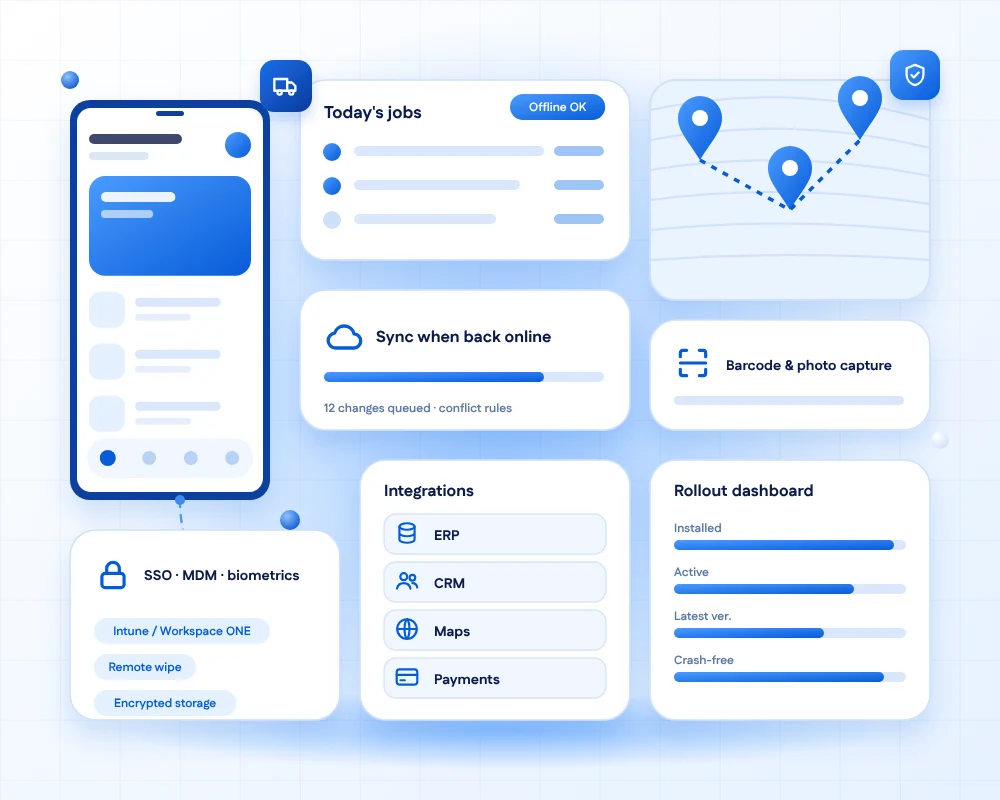
We build mobile apps for employees, field teams, partners and large customers, with single sign-on, device management, offline-first design and integration with your ERP, CRM and HR tools.
AI helps with testing, document capture and internal search. People confirm anything where accuracy matters, and your data rules decide what is shared.
- 11+Years of building business software
- 50+Global long-term clients
- 2,000+Projects delivered
- 24 hrsResponse time on queries
What we build
Six kinds of enterprise app
Each one removes steps from real work.

Field service & operations
Job lists, checklists, photos, signatures and live status for people working away from a desk.
Field
Employee apps
Approvals, leave, directories, news and tasks, gathered in one app your staff actually use.
Workforce
Sales & customer apps
Give sales teams customer records, quotes and orders on the go, connected to your CRM.
Sales
Warehouse & logistics
Barcode scanning, stock counts, picking and delivery proof on handheld or personal devices.
Logistics
Inspections & compliance
Structured forms, photos and audit trails that work offline and sync when the connection returns.
Compliance
B2B & partner portals
Ordering, tracking and support apps for dealers, suppliers and large customers.
Partners
Security & control
Built for IT and security teams too
The controls that let you approve an app and run it at scale.

Single sign-on
Sign in with your identity provider, with multi-factor authentication and sessions that expire correctly.

Role-based access
People see only the data and actions their role allows, enforced on the server, not just hidden in the app.

Device management
Works with mobile device and app management tools, with managed distribution and remote wipe.
Encrypted data
Data is encrypted in transit and on the device, and sensitive information is kept out of logs.
Audit trails
Who did what and when is recorded, to support internal audit and regulatory checks.

Offline & sync
Staff keep working with no signal, and changes sync with conflict rules agreed up front.
AI in enterprise apps
Less typing, faster answers
AI takes on repetitive capture and search tasks. People confirm what matters.

AI-generated test cases
Test cases covering roles, permissions and edge cases are drafted from your requirements, then reviewed by QA.

Document & form capture
Scan forms, labels and receipts and fill fields automatically, with a person confirming the result.

Search across your content
Staff find policies, manuals and past jobs by asking in plain language, with sources shown.

Usage and crash insight
Where staff get stuck, and which crashes affect which teams, grouped and prioritised.
How we roll out
From pilot to the whole workforce
Adoption is part of delivery, not an afterthought.
Map the work
Watch how people really do the job, and find the steps a mobile app can remove.
Discovery
Connect systems
Plan integrations with ERP, CRM, HR and identity systems, and agree who owns each data set.
Integrate
Build in pilots
Release to a small group first, learn from real use, then widen the rollout.
Pilot
Roll out & support
Managed distribution, training material and support, with measures that show adoption.
Adopt
What we measure
Success is use, not downloads
Measures we agree up front and report on after launch.
Quality you can check
What we verify before every rollout
The details that decide whether staff keep using the app.
- Works in poor coverageBasements, warehouses and rural sites are tested, not only the office wifi.
- Shared and managed devicesSign-out, data wipe and kiosk modes handled for shared handhelds.
- Least-privilege accessPermissions follow job roles and are reviewed with your security team.
- Integration monitoringFailed syncs with back-end systems are visible and alerted, not silent.
- AccessibilityLarge text, screen readers and glove-friendly controls where the job needs them.
- Change managementTraining, release notes and a feedback channel are part of the plan.
Connecting the app to your core systems?
Enterprise integration and API development links the app to ERP, CRM and more.
FAQs
Enterprise mobile & AI questions, answered
It is building mobile apps for business use, such as apps for employees, field teams, partners or large customers. These apps need strong security, integration with company systems, device management and reliable offline behaviour, on top of a good user experience.
Enterprise apps connect to internal systems, use company sign-in, follow security and compliance rules, are rolled out in a managed way and often must work offline. Adoption and support matter as much as features.
Yes. We design offline-first apps that store data securely on the device and sync when the connection returns, with clear rules for resolving conflicts.
Yes. We connect apps to systems such as ERP, CRM, HR and identity platforms through secure APIs, and monitor the connections so that failures are visible.
We use single sign-on, role-based access enforced on the server, encryption in transit and on the device, secure storage for secrets and audit logging. We review the design with your security team.
Yes. We build apps that work with common mobile device and app management tools, support managed distribution and remote wipe, and handle shared-device scenarios.
AI helps draft tests, capture data from documents and photos, search your internal content and spot usage problems. People confirm the results wherever accuracy matters, and your data handling rules decide what is shared with any model.
We pilot with a small group, learn from real use, then widen the rollout in stages, with training material, managed distribution and support from day one.
Many enterprise apps work well with a cross-platform framework, which saves cost across two platforms. Apps that rely on specialist hardware may need native code. We recommend after reviewing your devices and needs.
We provide maintenance, OS-update compatibility, security patches and new features under an agreed support plan, with response times that match how critical the app is to your operations.
Ready to put your workflows on mobile?
Tell us who will use the app, which systems it must connect to and what security rules apply. We will propose a pilot, the architecture and how we will measure adoption.