AI-Enabled ERP Software Development
 White-Label & Dedicated Teams - Offshore developers, maintenance and agency support
Headless CMS - Sanity, Payload, Storyblok, Prismic, Contentful, Strapi and Next.js
AI Solutions - AI agents, chatbots, automation and machine learning
WordPress & WooCommerce - Custom themes, plugins and online stores
Shopify & eCommerce - Shopify, BigCommerce, PrestaShop and Webflow builds
HubSpot CMS - Custom themes, modules and integrations
Custom Web Development - PHP, Laravel, CodeIgniter, CakePHP, MERN and MEAN
Mobile App Development - iOS, Android, Flutter and React Native
Business Software - CRM, ERP, SaaS and enterprise applications
UI/UX & Frontend - Figma, design systems and pixel-accurate Figma-to-HTML
White-Label & Dedicated Teams - Offshore developers, maintenance and agency support
Headless CMS - Sanity, Payload, Storyblok, Prismic, Contentful, Strapi and Next.js
AI Solutions - AI agents, chatbots, automation and machine learning
WordPress & WooCommerce - Custom themes, plugins and online stores
Shopify & eCommerce - Shopify, BigCommerce, PrestaShop and Webflow builds
HubSpot CMS - Custom themes, modules and integrations
Custom Web Development - PHP, Laravel, CodeIgniter, CakePHP, MERN and MEAN
Mobile App Development - iOS, Android, Flutter and React Native
Business Software - CRM, ERP, SaaS and enterprise applications
UI/UX & Frontend - Figma, design systems and pixel-accurate Figma-to-HTML
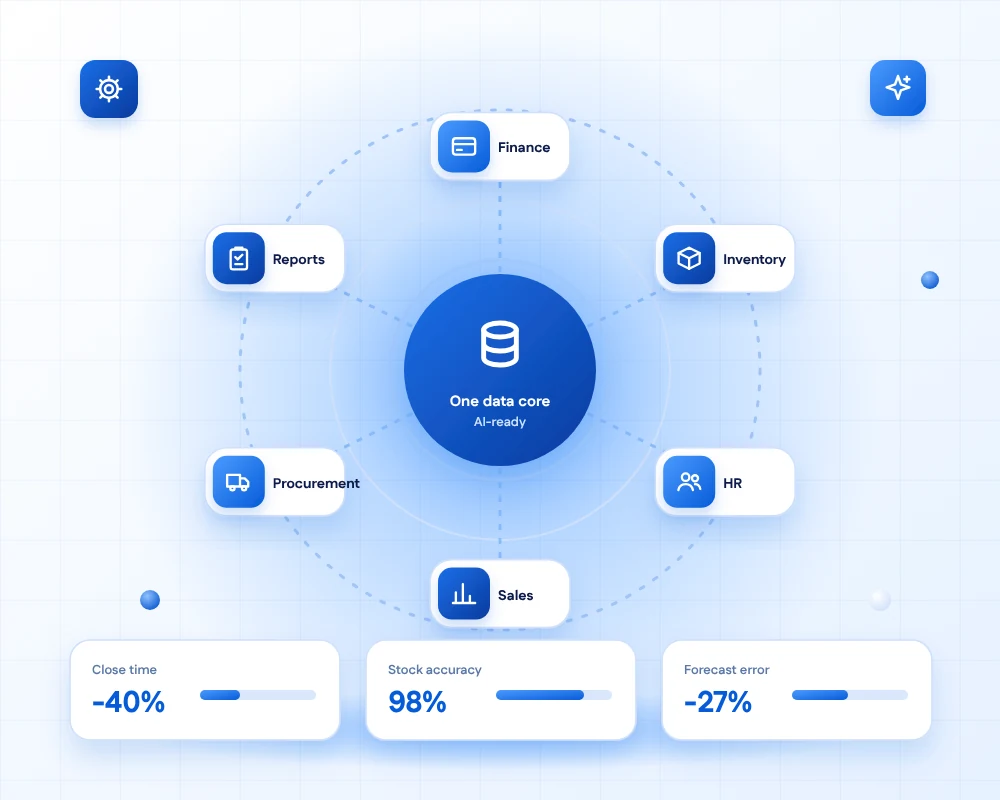
One data core
Custom ERP Software Development
An ERP joins the parts of your business that usually live in separate tools: finance, stock, sales, purchasing, people and reporting. When they share one data core, nobody re-types an order, and managers see the real position at any moment.
We build ERP systems and ERP modules around your processes, and extend or integrate the platforms you already use. Many clients keep an existing ERP and add the custom pieces it lacks.
AI forecasts demand, reads incoming documents and flags unusual transactions, so routine work shrinks and exceptions get attention.
- 11+Years of building business software
- 50+Global long-term clients
- 2,000+Projects delivered
- 24 hrsResponse time on queries
Modules
What an ERP covers
Start with the modules that hurt most and add others as you grow. Because they share one database, each new module makes the others more useful.

Finance & Accounting
Ledgers, invoicing, payables, receivables and month-end close, linked to every order and purchase.
Inventory & Warehouse
Real-time stock across locations, batches and serial numbers, with reorder rules and barcode scanning.

Sales & Orders
Quotes, orders, pricing rules and fulfilment tracked from first enquiry to delivery.
Procurement & Suppliers
Purchase requests, approvals, supplier records and goods receipt in one flow.

HR & Payroll
Employee records, leave, attendance and payroll connected to cost centres.

Reports & Dashboards
Live dashboards for owners and managers, built from the same data everyone else uses.
By industry
ERP shaped for how you operate
Pick an industry to see the typical scope.
ERP for manufacturers
Plan production, track materials and keep costs visible from raw material to finished goods.
- Bills of materials and work orders
- Production planning and capacity view
- Quality checks and batch traceability
- Costing by product and job
ERP for wholesale and distribution
Handle high order volumes, multiple warehouses and complex pricing without spreadsheets.
- Multi-warehouse stock and transfers
- Customer-specific pricing and rebates
- Pick, pack and ship with barcode scanning
- Supplier lead-time tracking
ERP for retail and online stores
Connect stores, web shops and marketplaces to one stock and customer record.
- Shopify and WooCommerce integration
- Omnichannel inventory and returns
- Loyalty and promotion rules
- Daily sales-to-ledger posting
ERP for service businesses
Track projects, time and billing so work turns into invoices quickly and accurately.
- Project budgets and time tracking
- Milestone and recurring billing
- Resource planning and utilisation
- Profitability by client and project
ERP for logistics and field operations
Coordinate fleets, shipments and field teams with live status and proof of delivery.
- Order, route and shipment tracking
- Driver and field mobile apps
- Proof of delivery and exceptions
- Cost per route and per customer
AI in your ERP
Fewer manual steps, earlier warnings
AI handles the data entry and pattern-spotting. People approve what gets posted.
Demand forecasting
Models use your sales history, seasonality and promotions to suggest stock levels, with the reasoning visible.
Document capture
Invoices, delivery notes and purchase orders are read and matched automatically, with exceptions sent to a person.

Anomaly alerts
Unusual postings, duplicate payments and odd stock movements are flagged for review.

Ask your ERP
Staff ask questions in plain language, such as "which customers are overdue?", and get answers from live data with permissions respected.
How we work
A phased route to go-live
Value arrives early and the scope grows only when you are ready.
- Phase 1
Discover
We map processes, documents and reports, and decide what to build, configure or connect.
- Workshops
- Process maps
- Data audit
- Phase 2
Design
Data model, roles and screens are prototyped and agreed, with the first release scoped.
- Prototypes
- Roles
- Integrations
- Phase 3
Build & migrate
Modules are delivered in sprints while data is cleaned, mapped and rehearsed.
- Sprints
- Data migration
- Testing
- Phase 4
Run & grow
Go-live support, training and a steady roadmap of improvements and new modules.
- Training
- Support
- Roadmap
Integrations
Works with your existing tools
An ERP is only as useful as the data flowing in and out of it.
- Existing ERPsExtend or integrate SAP, Microsoft Dynamics, NetSuite, Odoo and others through their APIs.
- Accounting softwareSync with Xero, QuickBooks and local accounting tools.
- eCommerce platformsOrders, stock and prices shared with Shopify, WooCommerce and marketplaces.
- Shipping & paymentsCarrier rates, labels, tracking and payment gateways.
- CRM & supportCustomer records shared with your CRM and support desk.
- BI & reportingClean data feeds for dashboards and advanced analytics.
Need to connect ERP, eCommerce, CRM and logistics?
Our integration engineers build reliable APIs, event flows and monitoring between systems.
FAQs
ERP & AI questions, answered
It is building or customising enterprise resource planning software that joins core operations such as finance, inventory, sales, procurement and HR on one shared database, so every team works from the same information.
A ready-made ERP suits standard processes. A custom or hybrid ERP is worth considering when your operations are unusual, when you need modules that suites do not offer, or when licensing grows costly. Many clients keep a core product and add custom modules around it.
Yes. We build custom modules, reports, workflows and integrations around platforms such as SAP, Dynamics, NetSuite and Odoo, using their supported APIs so upgrades stay possible.
AI forecasts demand, reads incoming documents, flags unusual transactions and lets staff query data in plain language. It reduces manual entry and surfaces problems earlier, while approvals and postings stay under human control.
A focused first release covering one or two modules can be live within a few months. Full ERP programmes are phased, so you gain value early and extend over time. We agree a roadmap after discovery.
We audit and clean your current data, map it to the new structure, rehearse the migration several times and reconcile balances and quantities before go-live.
Yes. Integration is a core part of ERP work. We connect to accounting, eCommerce, shipping, payment, CRM and reporting systems through APIs and events.
Yes. We build responsive interfaces and mobile apps for warehouse, sales and field staff, including barcode scanning and offline use where needed.
We use role-based permissions, approval workflows, audit trails, encryption and backups. For regulated environments we agree the applicable controls with you at the start.
We offer support plans with agreed response times, plus a roadmap for new modules, reports and automations.
Ready for one view of your business?
Tell us which processes cause the most pain. We will suggest the right route, the first modules and where AI will help.